TDS Return Filing Software Features

Everything in Online TDS Software, from TRACES to filing, in one cloud based tool for CAs, tax consultants and corporates.

Trusted by 10,000+ users across India

  • Aarti Industries Limited logo – Online TDS Software client
  • Cello logo – Online TDS Software client
  • Essar logo – Online TDS Software client
  • Glenmark logo – Online TDS Software client
  • Ion Exchange logo – Online TDS Software client
  • Kohinoor Hospital logo – Online TDS Software client
  • Reliance Capital logo – Online TDS Software client
  • Skoda Auto logo – Online TDS Software client
  • Volkswagen logo – Online TDS Software client
  • Walter Advisors logo – Online TDS Software client
  • Yash Raj Films logo – Online TDS Software client
TRACES integrated TDS software

TRACES Integrated TDS Software: TRACES Control Center

See what TRACES says about every deductor without logging in to the TRACES site, and send requests in one click.
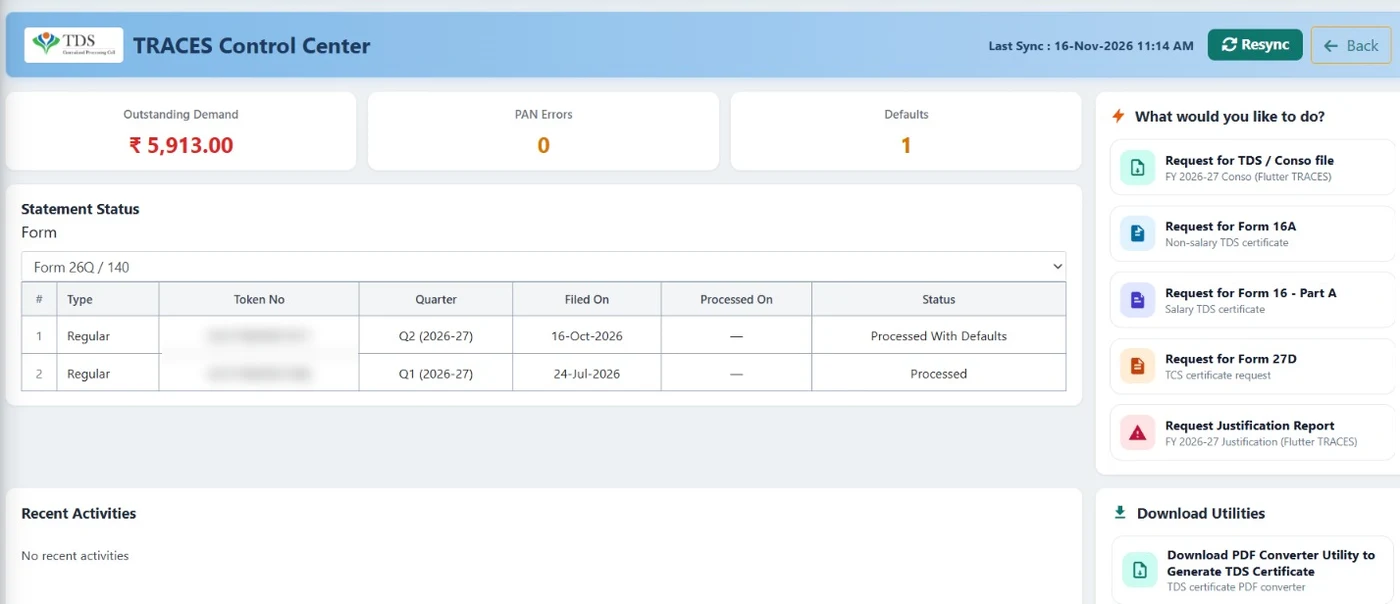
  • Outstanding demand, PAN errors and defaults at a glance
  • Statement status with token number, filed and processed dates
  • Request Conso file, Form 16, Form 16A, Form 27D and justification report
  • Auto PAN verification directly from TRACES
TRACES Control Center in Online TDS Software: outstanding demand, PAN errors, defaults, statement status and TRACES requests
Predict Defaults

Predict Defaults: See the TRACES Demand Before You File

Predict Defaults works out what TRACES may raise as a notice or demand once the return is processed, and shows the total predicted demand with details for each item.
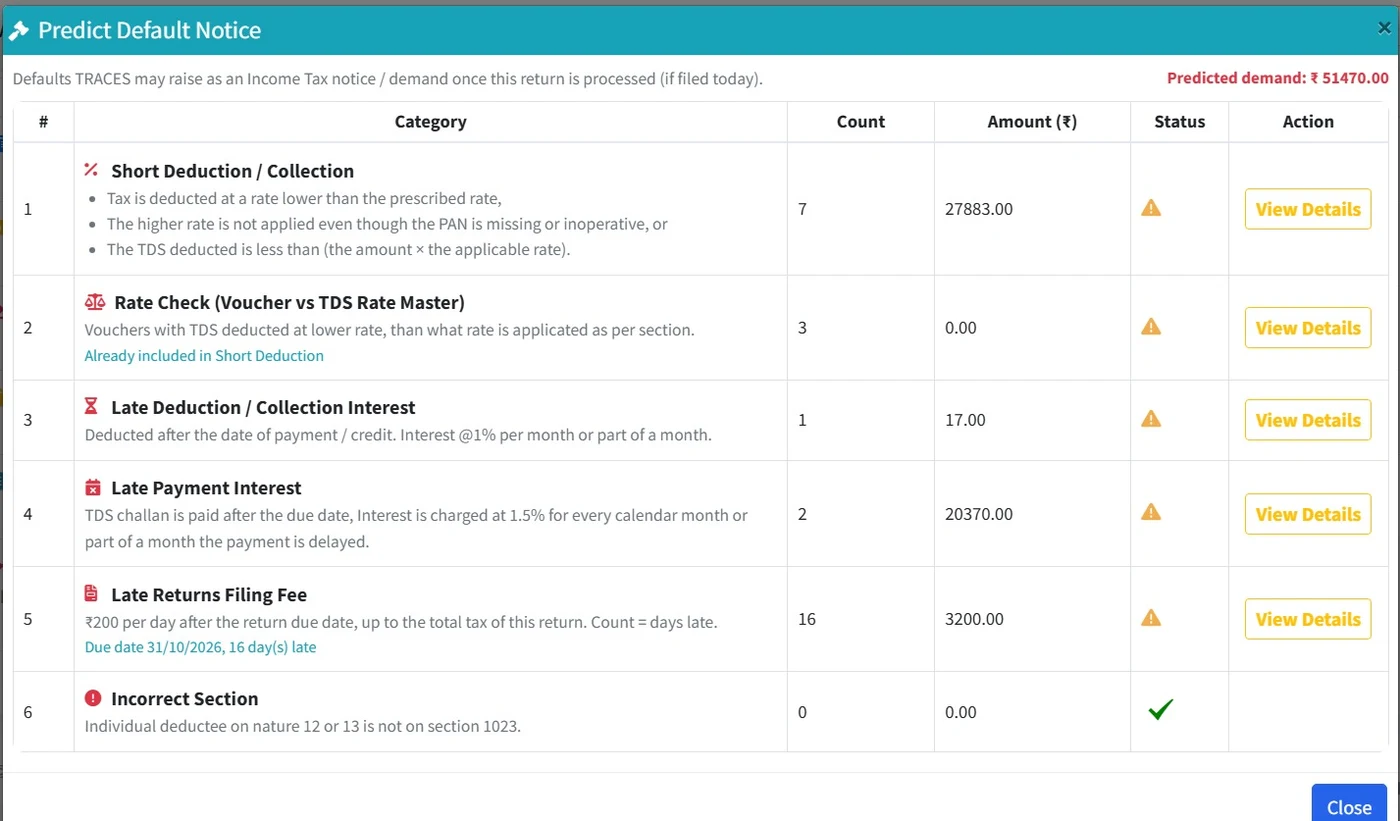
  • Short deduction, including higher rate for missing or inoperative PANs
  • Rate check against the TDS rate master
  • Late deduction and late payment interest
  • Late filing fee and incorrect section
Predict Defaults in Online TDS Software: predicted TRACES demand by category
Pre-FVU Validation

Pre-FVU Validation: Fix Every Error Before the FVU

The Pre-FVU checklist runs before the return file is created, so problems are fixed in the software, not at upload.
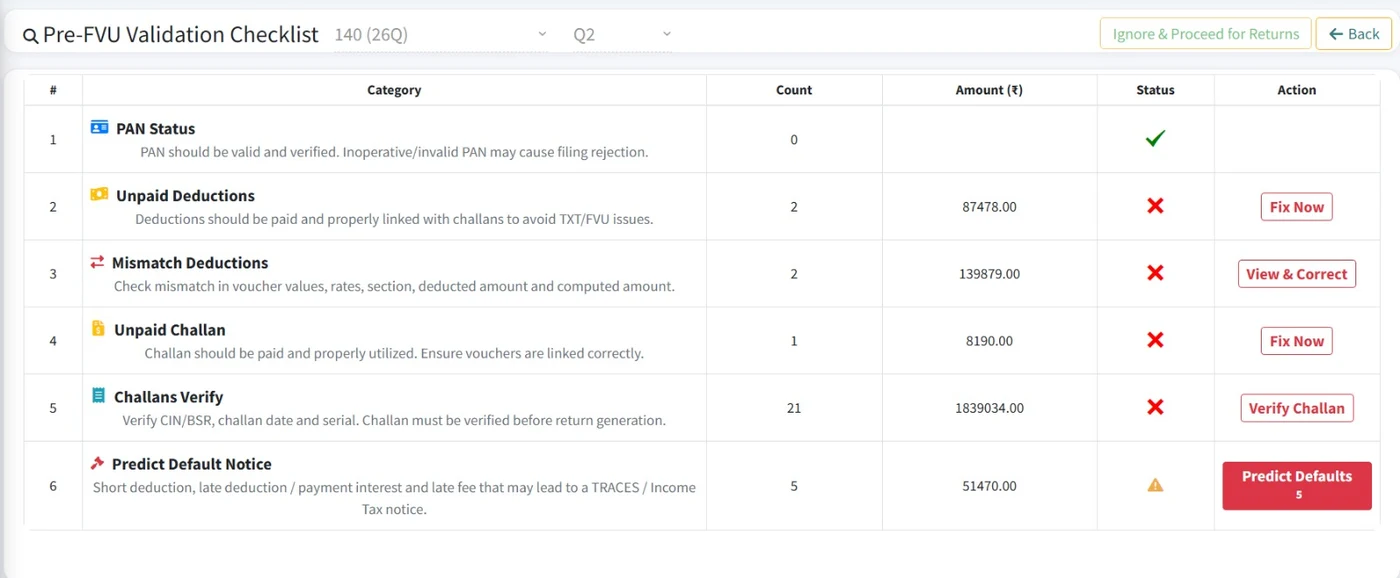
  • PAN status, unpaid and mismatched deductions
  • Unpaid challans and challan verification (CIN, BSR code, date, serial)
  • Fix Now and View & Correct take you straight to the problem
  • Predict Defaults included in the checklist
Pre-FVU validation checklist in Online TDS Software for Form 140 (26Q)
Salary TDS Computation

Salary TDS Computation: New and Old Regime

Work out each employee's tax for the year and the TDS to deduct, with every line of the computation visible.
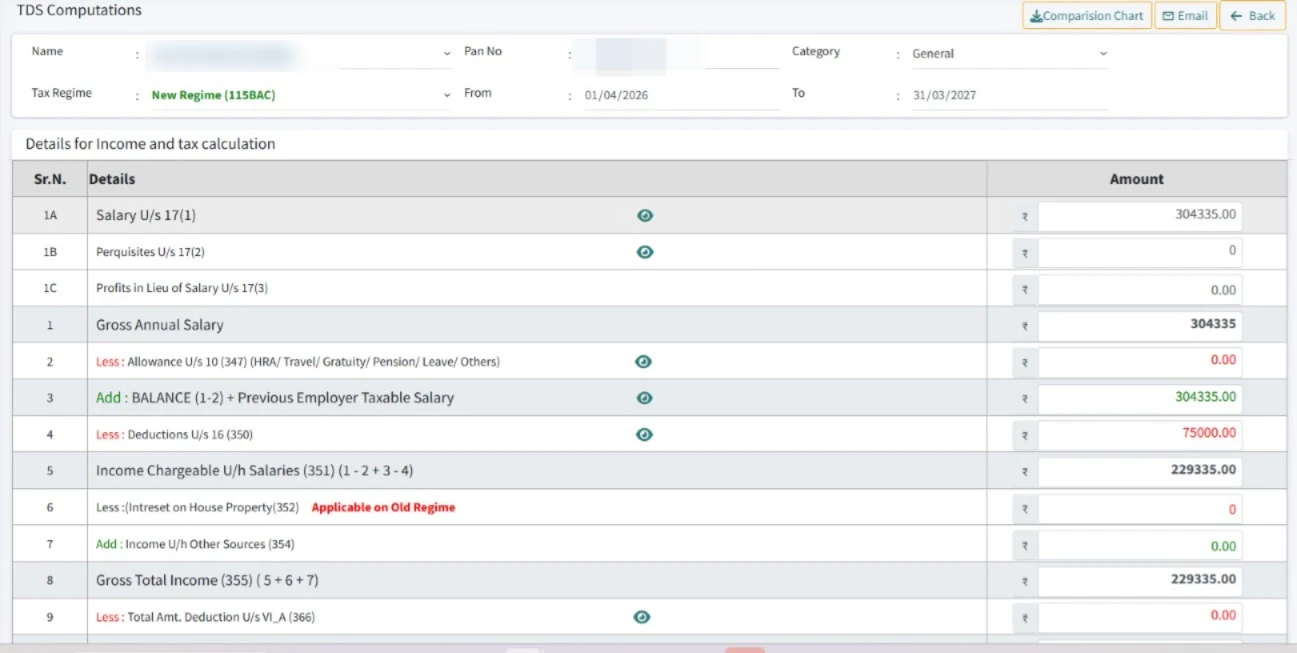
  • New Regime (115BAC) or old regime per employee
  • Salary, perquisites, allowances, standard deduction and Chapter VI-A
  • Compare both regimes in a chart and email the computation
  • Auto tax calculation for salary and non-salary payments
Salary TDS computation in Online TDS Software under the new tax regime
Multi Company Manager

Multiple Deductors: Every Client in One Login

Keep all companies and deductors in one list. Switch company and financial year from the top bar.
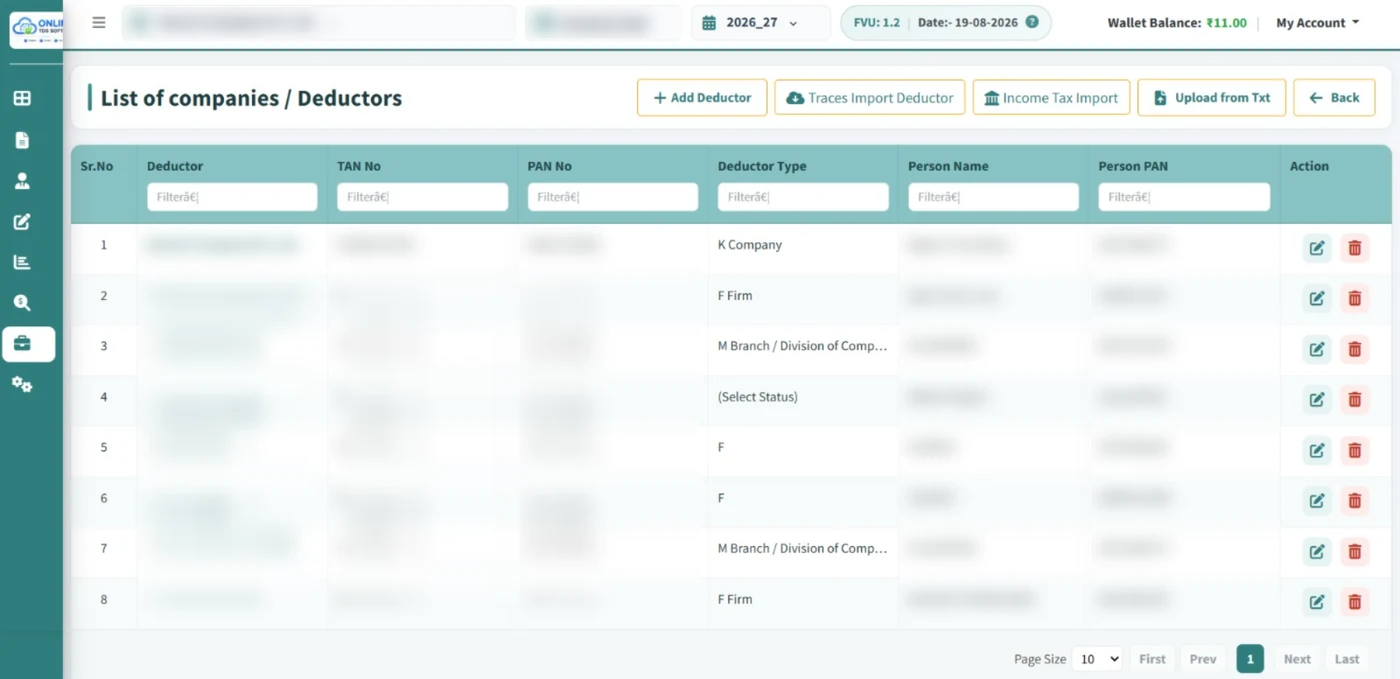
  • Add deductors by hand, or import from TRACES or the Income Tax portal
  • Upload an existing TXT return to bring a deductor across
  • Multi-user access with definable restrictions
  • Unlimited deductors and deductees on the Enterprise plan
Multi Company Manager in Online TDS Software: list of companies and deductors
Bulk PAN Verification

Bulk PAN Verification from TRACES

Check every deductee's PAN in one click and fix problem PANs before they cost a higher TDS rate.
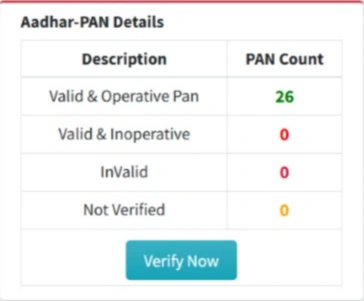
  • Valid and operative
  • Valid but inoperative
  • Invalid or not verified
Bulk Aadhaar-PAN verification in Online TDS Software
Challans and filing

From Online Challan Payment to a Ready-to-File Return

Online Challan Payment

Pay TDS challans from the software, then verify and map them to deductions.

  • Pay challans online
  • Verify CIN, BSR code, date and serial
  • Map challans to deduction entries
  • Find unconsumed challans

Online TDS Return Filing

Once the TXT file is validated and the FVU is created, we email it to you as a ZIP, ready to file.

  • Validated with the latest FVU utility
  • ZIP emailed, ready to file
  • File with our in-house filing service*
  • Or upload it yourself on the e-filing portal
*Optional service. Filing charges may apply separately.
Everything else

More Features of Our Online TDS Software

Correction returns

Import the Conso file and file corrections.

Form 16, 16A and 27A

Generate, download and email certificates.

Excel import and export

Bring data in from Excel or a TXT return.

Backup and restore

Keep a backup of every deductor's data.

Multi-user access

Team logins with definable restrictions.

Automatic FVU updates

Always on the latest validation utility.

MIS and reports

Quarter-wise reports by deductor.

Due date tracker

Due dates and days left, every quarter.

Earlier years

Prepare returns for previous financial years.

TDS sections and rates

Look up sections, rates and payment codes.

Unlimited transactions*

No per-transaction software charges.

High-volume processing

Built for large TDS data.

*Subject to plan terms.

Forms supported

All TDS and TCS Return Forms, Old and New

Tax Year 2026-27 returns use the new forms. Earlier periods and their corrections use the old ones.

ReturnUp to FY 2025-26Tax Year 2026-27 onwards
TDS on salaryForm 24QForm 138
TDS on other payments to residentsForm 26QForm 140
TDS on payments to non-residentsForm 27QForm 144
TCS returnsForm 27EQForm 143

Map old sections to the new 4-digit codes with our free TDS Payment Code Mapper.

Pricing

TDS Software Pricing: Simple Yearly Plans

All TDS and TCS forms in every plan. Unlimited deductors and deductees with Enterprise.

Standard

₹5,500

per year

  • All TDS and TCS return forms
  • Web based, no installation
  • For businesses filing their own returns
Compare plans

Enterprise

₹16,000

per year

  • Everything in Professional
  • Unlimited deductors and deductees
  • Multi-user login with TAN-based access
  • Bulk import / export in corrections
  • Team management
Compare plans

Full plan details on the TDS software pricing page.

FAQs

TDS Software Features: FAQs

What features does Online TDS Software have?

TRACES Control Center, Predict Defaults, Pre-FVU validation, salary TDS computation, multi company management, bulk PAN verification, online challan payment, correction returns, Form 16/16A and online TDS return filing, plus Excel import, backup and multi-user access.

Is Online TDS Software TRACES integrated?

Yes. The TRACES Control Center shows outstanding demand, PAN errors, defaults and statement status, and lets you request the Conso file, Form 16, Form 16A, Form 27D and justification reports.

How does Predict Defaults work?

It checks your return the way TRACES processes it and shows the likely demand for short deduction, rate check, late deduction and payment interest, late filing fee and incorrect section, before you file.

Which TDS return forms are supported?

Forms 138, 140, 144 and 143 for Tax Year 2026-27 onwards, and Forms 24Q, 26Q, 27Q and 27EQ for earlier periods and their corrections.

Can several team members use the software?

Yes. Multi-user access lets you add team logins with definable access restrictions.

More answers in the online TDS return filing FAQs.

File your next TDS return in Online TDS Software

See it live in a free demo.

Call 98926 06006 or 93728 93410
9:30 AM – 6:30 PM IST
Call Book free demo
Chat on WhatsApp